

Marketing intelligence is the systematic collection and interpretation of data about your market, competitors, and content performance to inform specific decisions: what to write, what to update, and what to stop doing. For a WordPress site owner, that means pulling real data from Google Search Console, analyzing what your competitors rank for, and tracking how your published posts perform over time. The goal is not a dashboard. The goal is a weekly decision that makes your next post more likely to rank than your last one.
Most definitions of marketing intelligence read like business school textbooks. They talk about “systematic processes for gathering, analyzing, and interpreting data about markets, competitors, customers, and industry trends,” as CDP.com’s glossary puts it. That is technically correct and practically useless when you are sitting in front of a WordPress admin screen trying to decide whether to write about “email marketing tips” or “email marketing for dental practices.” You do not need a framework. You need a workflow that takes raw data and turns it into a published post. That is what this article lays out.
What Marketing Intelligence Actually Means (Beyond the Buzzword)
Marketing intelligence, in a WordPress context, is the loop between three things: what people are searching for, what your competitors are ranking for, and what your own site is already doing. Close that loop and you have a content engine. Leave it open and you have a keyword spreadsheet that sits in Google Drive until you forget it exists. We have documented this exact gap before: the keyword list is 5% of the work, and the content pipeline is 95%.
Here is what separates marketing intelligence from generic “data-driven decisions” platitudes. Marketing intelligence uses first-party data, meaning data from your own site’s actual performance, as the primary input. Not estimates from a third-party keyword tool. Not a competitor’s guessed search volume. Your own Google Search Console data, which shows the exact queries real users typed, how many times your site appeared, how many clicked, and where you ranked. That is first-party data. It is more accurate than any estimate a paid tool can provide because it comes directly from Google’s own logs.
The distinction matters because most small business owners are sitting on a goldmine of first-party data and ignoring it. You have Search Console connected to your site. It is free. It shows you which queries drive traffic, which pages are gaining impressions, and which keywords sit on page 2 waiting for a content update to push them to page 1. That is marketing intelligence. Not a $139/month dashboard you open twice a quarter, as we break down in our SEO monitor tools cost analysis.
The Difference Between Marketing Intelligence and Market Research
Market research is a one-time project. You commission a survey, buy an industry report, or run a competitor analysis. You get a document. Marketing intelligence is continuous. It is the ongoing habit of checking your data weekly, interpreting what changed, and making one content decision based on that change. Market research tells you what the market looked like three months ago. Marketing intelligence tells you what your site did last week and what to write about next.
For a solo WordPress operator, market research is a luxury. Marketing intelligence is a necessity. You cannot afford to commission reports. You can afford to spend 15 minutes every Monday morning in Search Console, and that is enough to build a functional intelligence workflow. The key is knowing which data points to look at and which to ignore.
The 4 Layers of Marketing Intelligence You Need
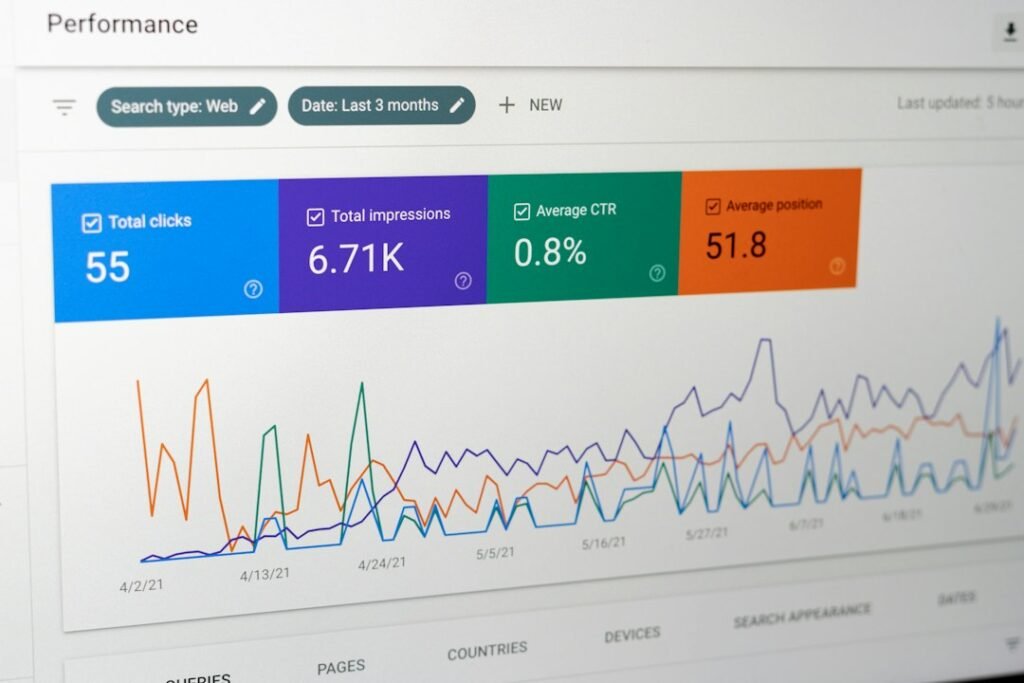
Marketing intelligence for a WordPress site breaks down into four layers, each feeding the next. Skip a layer and the loop breaks. You end up with data that does not lead to decisions, or decisions made without data to back them up.
| Layer | What It Does | WordPress Data Source | Key Metric | Decision It Drives |
|---|---|---|---|---|
| 1. Keyword Intelligence | Identifies what people search for and which terms are winnable | Google Search Console queries, Google PAA, Autocomplete | Impressions by query | What to write about next |
| 2. SERP Intelligence | Analyzes who ranks for your target keywords and why | Manual SERP review, competitor site analysis | Top 5 ranking domains | Whether a keyword is winnable or out of reach |
| 3. Content Performance Intelligence | Tracks how your published posts perform over time | Google Search Console Performance report | CTR and average position trend | What to update, expand, or retire |
| 4. Competitive Intelligence | Monitors competitor content moves and gaps | SERP comparison, Search Console page-2 keywords | Content gap count | Where competitors are weak and you can win |
Layer 1: Keyword Intelligence
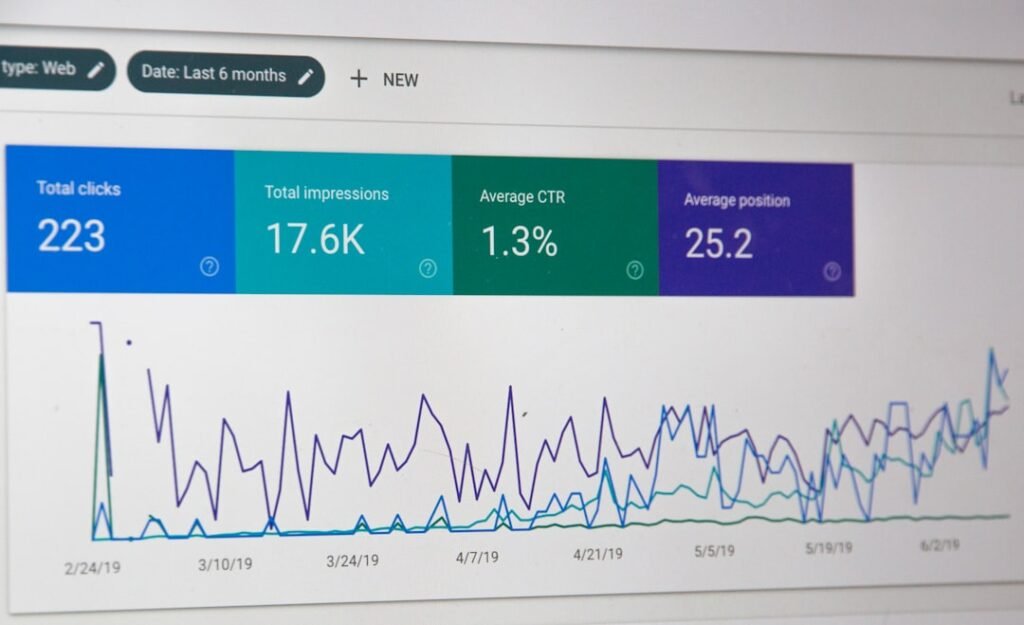
Keyword intelligence starts with your own Search Console data, not a paid keyword tool. Open Search Console, go to Performance, then Search Results. Set the date range to the last 28 days. Sort by impressions descending. The queries at the top of that list are the terms Google already associates with your site. These are your fastest opportunities because you already have topical relevance.
Filter for queries where your average position is between 8 and 20. These are page-2 keywords: Google is showing your site, but not on page 1. According to First Page Sage’s 2026 CTR study covering 3.67 billion Google impressions, blended position 1 CTR is now 7.1%, position 5 is 0.7%, and positions 8 through 10 are at 0.2% to 0.3%. A page sitting at position 12 is getting almost zero clicks. Pushing it to position 5 means a potential 2x to 3x click increase. Pushing it to position 3 means roughly 2.4x more clicks than position 5. That is the math that makes keyword intelligence actionable.
For new keywords where you have zero presence, use Google’s People Also Ask and Autocomplete. These are free, real-time, and based on actual search behavior. We walk through the full free keyword discovery workflow in our competitor keyword pipeline guide: PAA gives you 30 to 50 question-based keywords per seed query, and Autocomplete gives you 50 to 100 phrases per seed. For a site producing fewer than 50 posts, that is more keywords than you can write about.
Layer 2: SERP Intelligence
Before you write a single word for a target keyword, search it in Google and read the top 5 results. This is SERP intelligence, and it is the step most small business owners skip. They find a keyword, see decent search volume in a tool, and start writing. Then the post ranks at position 45 because the top results are dominated by sites with 10x their domain authority.
SERP intelligence means looking at who occupies positions 1 through 5 and asking three questions. Are they major publications, Wikipedia, or high-authorality domains you cannot compete with? If yes, the keyword is out of reach. Are they small businesses, niche blogs, or sites with similar authority to yours? If yes, the keyword is winnable. What do their posts cover that yours could do differently or better? That gap is your content brief.
Also check whether the SERP has changed shape. As of 2026, AI Overviews now appear on a large share of US queries, and Research from Advanced Web Ranking suggests that when an AI Overview is present, position 1 CTR on desktop drops significantly compared to SERPs without one. If a SERP for your target keyword now has an AI Overview, your content strategy needs to account for that: aim for the AI Overview citation, not just the organic result below it. That is a marketing intelligence decision driven by reading the SERP, not by reading a keyword tool.
Layer 3: Content Performance Intelligence
Content performance intelligence is the layer most WordPress site owners neglect completely. You publish a post, check it once a week later, see it is not on page 1, and conclude it failed. Then you never look at it again. That is not performance tracking. That is impatience.
A new post typically takes 3 to 6 months to see meaningful organic traffic. During that period, Search Console shows you leading indicators: impressions appearing for the target keyword, average position creeping from 45 to 28 to 15, CTR improving as your title and meta description get tested by real users. These are the metrics that tell you whether a post is on the right trajectory before traffic arrives.
The specific workflow: pull a 28-day comparison in Search Console every week. Look for queries where impressions increased by more than 20% and queries where they dropped by more than 20%. For gaining queries, check if the corresponding page can be expanded with more depth or internal links. For losing queries, check if a competitor published something fresher, if a SERP feature changed, or if a WordPress plugin update broke your schema markup. We cover this triage process in detail in our SERP position monitoring guide.
Layer 4: Competitive Intelligence
Competitive intelligence for a small business is not about downloading a competitor’s full keyword list from a $139/month tool. It is about identifying the 3 to 5 competitors who rank for the same keywords you target and checking what they do differently. For each page-2 keyword in your Search Console data, search that term in Google and note who ranks above you. That is your competitor set for that keyword.
The actionable question is not “what keywords do they rank for?” but “what does their ranking page have that mine does not?” Maybe they have a comparison table you skipped. Maybe their post is 2,000 words and yours is 600. Maybe they published last month and yours is two years old. Each difference is a content update you can make in 30 minutes. You do not need a paid keyword intelligence tool for this. You need 10 minutes and an incognito window.
Building a Marketing Intelligence Workflow on WordPress

Marketing intelligence only works if it connects to a publishing action. Data without action is the trap we see across every small business: keyword spreadsheets exported and abandoned, rank trackers paid for and ignored, Search Console data available but never opened. The fix is a weekly workflow that takes 30 minutes and produces one content decision every time.
The Monday Morning Routine
Step 1 (10 minutes): Open Google Search Console. Go to Performance, then Search Results. Set the date range to the last 7 days and compare against the previous 7 days. Sort by clicks. Note any query where clicks changed by more than 20%. Then sort by impressions and note queries with high impressions but low CTR, which signals a title or meta description problem.
Step 2 (10 minutes): For each significant change, identify the page URL. If a page dropped in impressions or position, search the keyword in Google and compare your page against the results now ranking above you. Note one specific thing you can improve: a missing section, an outdated statistic, a weaker title tag, a missing internal link.
Step 3 (10 minutes): Make one decision. Pick the single most impactful action from your triage. Write it down as your content task for the week. That might be “update the email marketing post with a 2026 statistics section” or “write a new post targeting the query ’email marketing for dental practices’ that just appeared in Search Console.” Do not try to act on everything. One decision per week, 52 decisions per year.
Connecting Intelligence to Publishing
Here is where most workflows break. You identified the keyword. You analyzed the SERP. You know what to write. Then you stare at a blank WordPress editor for an hour, get distracted, and the post never gets written. The intelligence loop closes only when the post goes live.
This is the gap ClearPost was built to close. Instead of collecting intelligence in one tool, drafting in another, and manually formatting in WordPress, the workflow stays inside your site. Your Search Console data identifies the content gap. The AI generates a draft with SEO structure, internal links, and meta tags already in place. You review for 10 to 15 minutes per post, edit if needed, and approve. Nothing publishes without your sign-off. Any tool that auto-publishes without a human approval step is a liability, not a feature. The 15 minutes you spend reviewing each post is the difference between content that compounds and content that collapses.
What It Costs: Manual Research vs. AI-Assisted Intelligence
The cost of marketing intelligence is not just the subscription price of whatever tool you use. It is the hours you spend on research, the hours you spend writing, and the opportunity cost of posts you never publish because the workflow is too slow. Here is the real cost math for a solo WordPress operator producing 8 posts per month.
| Cost Component | Manual Research + Manual Writing | Paid Tool + Manual Writing | AI-Assisted (ClearPost) |
|---|---|---|---|
| Keyword research tool | $0 (GSC + free methods) | $99–$139/month (third-party SEO tool) | $0 (uses your GSC data) |
| Research time per post | 90 minutes | 45 minutes | 10 minutes |
| Writing time per post | 75 minutes | 75 minutes | 15 minutes (review only) |
| Total labor per post | 165 minutes ($55 at $20/hr) | 120 minutes ($40 at $20/hr) | 25 minutes ($8.33 at $20/hr) |
| Monthly labor (8 posts) | $440 | $320 | $67 |
| Monthly tool cost | $0 | $139 | ClearPost plan |
| Total monthly cost | $440 | $459 | $67 + plan |
| 12-month total | $5,280 | $5,508 | $804 + annual plan |
Read the table by total cost, not by line item. The manual approach costs $440 per month in labor alone because the research and writing time adds up fast. The paid-tool approach costs $459 per month because you pay $139 for the tool and still spend 120 minutes per post writing and formatting. The AI-assisted approach drops labor to $67 per month because the AI handles research and drafting, and your only manual step is the 15-minute approval review per post.
The 12-month total is the number that should make you pause: $5,280 for manual research and writing, $5,508 for a paid tool plus manual writing, versus $804 plus the ClearPost plan for the same 8 posts per month. The gap between $5,280 and roughly $804 is the cost of doing intelligence manually when you could be doing it systematically. That is not a pricing comparison. It is a workflow comparison, and the workflow determines the cost.
The Hidden Cost: Posts Never Published
The table above assumes 8 posts per month actually get published. In reality, most solo operators aiming for 8 posts per month publish 2 to 3. The research gets done. The keywords get identified. The drafts sit unfinished because writing 1,200 words takes time you do not have after running your business. The opportunity cost of those 5 unpublished posts is not zero. It is 5 posts that could have been ranking, driving traffic, and generating leads for 12 months. At even 50 organic clicks per month per post, that is 250 lost clicks per month, 3,000 lost clicks per year.
This is the real cost of a broken intelligence workflow. The data is free. The tools are available. The bottleneck is the pipeline between intelligence and publishing. If your marketing intelligence tells you what to write but nothing gets written, the intelligence has zero return on investment.
Start Putting Your Data to Work
You already have the data. Google Search Console is connected to your site, free, and showing you exactly which keywords to target, which pages to update, and where your content gaps are. The question is whether you have a workflow that converts that data into published WordPress posts. If you do not, the intelligence is wasted. If you do, every post you publish gets smarter because it is informed by the performance of every post that came before it.
ClearPost closes the loop between intelligence and publishing. Your Search Console data identifies the targets. AI generates drafts with SEO structure, internal links, and meta tags. You approve every post before it goes live. No auto-published drafts, no unreviewed output, no brand damage from hallucinated statistics. The intelligence tells you where to focus. ClearPost handles the production. Try ClearPost free for 7 days. AI does the heavy lifting, you approve every post before it goes live. No long onboarding, no agency overhead, cancel anytime. See what 30 SEO-optimized posts a month looks like compared to the 4 you are getting now.
Frequently Asked Questions
What is marketing intelligence in simple terms?
Marketing intelligence is the systematic process of collecting and interpreting data about your market, competitors, and content performance to make specific decisions about what to write, what to update, and what to stop doing. For a WordPress site owner, it primarily means using your own Google Search Console data to guide content decisions.
How is marketing intelligence different from market research?
Market research is a one-time project that produces a report about market conditions at a specific point in time. Marketing intelligence is continuous: it is the ongoing habit of checking your data weekly, interpreting what changed, and making one content decision based on that change. Market research tells you what the market looked like months ago; marketing intelligence tells you what your site did last week.
What is first-party data in marketing intelligence?
First-party data is data collected directly from your own properties and audience. In a WordPress context, that means your Google Search Console data: the exact queries real users typed, how many times your site appeared in results, how many clicked, and your average position. First-party data is more accurate than third-party estimates because it comes directly from Google’s own impression and click logs.
How much does marketing intelligence cost for a small business?
The data itself can be free if you use Google Search Console, Google People Also Ask, and Autocomplete. The real cost is labor: manual research and writing for 8 posts per month costs roughly $440 per month in time at $20 per hour, or about $5,280 per year. AI-assisted tools that use your Search Console data to generate drafts can reduce that to roughly $67 per month in labor plus the tool subscription.
How often should I review my marketing intelligence data?
Weekly, not daily. A 30-minute Monday morning routine is sufficient: pull 7-day Search Console data, compare against the previous week, identify pages that gained or lost significant impressions or position, and make one content decision. Daily checking creates noise and anxiety without producing actionable decisions. Monthly is too slow to catch ranking drops before they cost you traffic.