
You installed a rank tracker six months ago. You imported 500 keywords from a seed list, watched the dashboard populate, felt a brief rush of productivity, and never opened it again. The dashboard is still running. You are still paying for it. And you have not made a single content decision based on anything it told you. That is the difference between a SERP position monitor used for ego and one used for action. The tool is the same. The workflow is what separates signal from noise.
Here is the reframe: stop asking “where do I rank?” and start asking “did ranking movement tell me to do something?” A rank tracker that you check but never act on is a $139/month anxiety machine. A rank tracker that triggers a content update, a new post, or a technical fix is an investment. This article walks through what a SERP position monitor should actually tell you, when free data from Google Search Console is enough, when a paid tool earns its keep, and how to set up a 15-keyword weekly workflow that connects to real content decisions.
What a SERP Position Monitor Actually Does
A SERP position monitor tracks where your pages rank in Google search results for specific keywords over time. Not a one-time check. Continuous tracking that shows movement: up, down, or stagnant. That is the core function, and everything else is a feature layered on top of it.
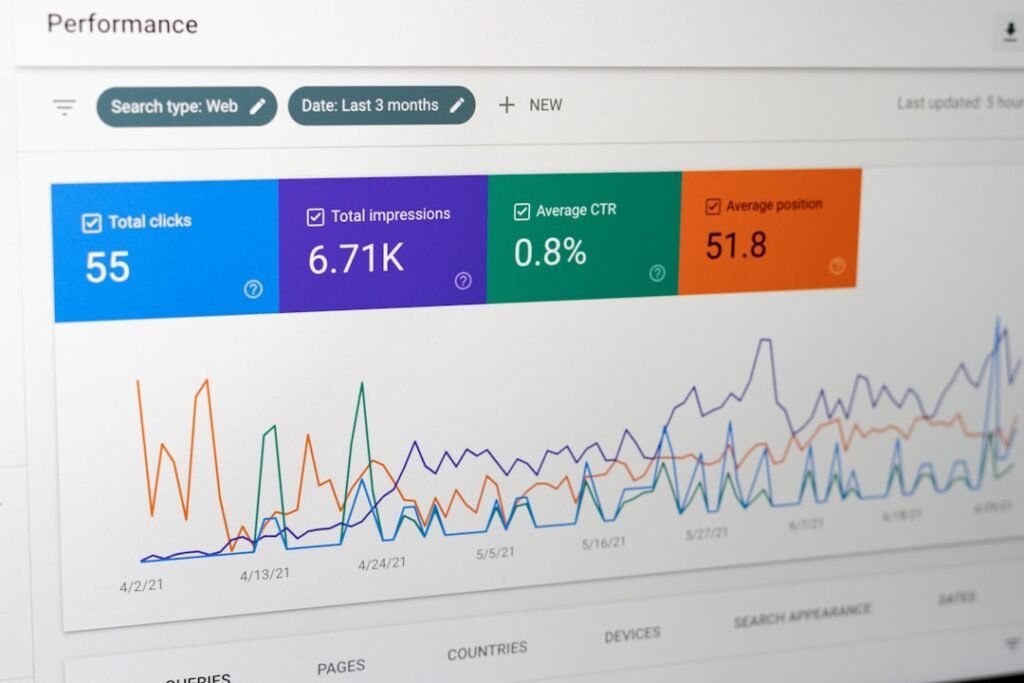
The confusion starts because people conflate rank tracking with Google Search Console. They are not the same tool. Google Search Console shows impressions, clicks, and average position for queries where your site appeared. But that average position is an impression-weighted blend across every location, device, search history, and query variant that produced an impression. Google’s own documentation is blunt about this: “The position value shown in the Performance report is the topmost position occupied by a link to your property or page in search results, averaged across all queries in which your property appeared.” If your page appeared at position 3 on five impressions and position 85 on one, GSC reports average position 16, a number that does not represent any actual ranking your page ever held.
A dedicated SERP position monitor does something different. It queries Google from a fixed location, on a fixed device, on a schedule, for a specific set of keywords, and records the position each time. You get a daily or weekly snapshot you can chart over time. You can see that “best CRM for small business” moved from position 7 to position 4 over six weeks. Search Console can tell you average position changed from 12.3 to 8.1, but it cannot show you a daily line chart for one keyword. It does not store per-keyword, per-day position data in a way you can visualize. It has no alerts. If a money keyword drops off page one overnight, you find out only when you happen to log in and filter.
The Honest Limitation No Rank Tracker Admits
No rank tracker is perfectly accurate, and the reason is simple: Google personalizes results. The same query returns different rankings based on the searcher’s location, device, search history, time of day, and whether they are signed into a Google account. A rank tracker queries from a datacenter IP with no search history, no personalization, no cookies. That means the number it reports is what an anonymous, clean-profile user sees from that specific location. It is not what your actual customers see.
This is why your rank tracker says position 4 but your GSC average position says 9, and when you search the keyword yourself in an incognito window you see position 6. All three numbers are correct. They measure different things. The rank tracker gives you a controlled, repeatable baseline. GSC gives you an impression-weighted average of real searches. Your incognito search gives you one personalized snapshot. Understanding this gap is the difference between trusting your tracker blindly and using it as one signal among several.
When Rank Tracking Becomes Ego, Not Action
Rank tracking for ego looks like this: you open the dashboard, scan the top-level metric, see your average position moved from 14.2 to 13.8, feel good, close the tab. No action taken. No content updated. No decision made. You are checking rankings the way you check social media follower counts: for a dopamine hit that changes nothing.
Rank tracking for action looks like this: you open the dashboard, filter for keywords that dropped more than 3 positions in the last 30 days, identify two pages that are sliding, open those pages, compare them against the URLs now ranking above you, update the content, and republish. The tracking tool told you where to spend your time. That is the only justification for paying for one.
Free vs Paid SERP Tracking: The Real Tradeoff
Google Search Console is free, already connected to your site if you verified it, and gives you real search data from actual users. That is your baseline. The question is not whether you need GSC (you do, and it costs nothing) but whether a paid SERP position monitor earns its subscription on top of that free data.
Here is the honest breakdown. GSC gives you impressions, clicks, click-through rate, and average position for every query where your site appeared. It does not give you daily per-keyword tracking, competitor benchmarking, SERP feature monitoring, or alerts. It does not let you track a keyword you do not already rank for. If you want to know where you stand for a target keyword you are trying to break into, GSC will not show you anything until you start appearing.
Paid tools fill those gaps. The three most common options, with pricing verified as of August 2026:
SE Ranking Core at $129/month (or $103.20/month billed annually) tracks 2,000 keywords daily across 10 projects. It is the best value for daily tracking at scale. Semrush SEO at $139/month (or $117.33/month annual) tracks 500 keywords daily with the full SEO suite attached. Ahrefs Lite at $129/month (about $108/month annual) tracks 750 keywords, but only weekly unless you pay extra for the Project Boost add-on for daily updates.
Here is the cost math that most comparisons skip. A 10-person agency tracking 200 keywords across 15 client sites needs a tool that supports multiple projects. SE Ranking Growth at $279/month (annual) covers 5,000 daily keywords across 30 projects. That is $3,348/year for rank tracking alone, before any content tools. A solo site owner tracking 15 keywords on one site does not need any of this. GSC plus a free rank checker for spot checks covers it. The paid tool earns its keep when you need competitor tracking, daily updates, or you manage enough sites that logging into GSC for each one is inefficient.
| Tool | Monthly Price | Tracked Keywords | Update Frequency | Best For |
|---|---|---|---|---|
| Google Search Console | $0 | All queries you rank for | Rolling (3-day delay) | Baseline data, real impressions |
| SE Ranking Core | $129 ($103.20 annual) | 2,000 | Daily | Best value daily tracking |
| Semrush SEO | $139 ($117.33 annual) | 500 | Daily | Full SEO suite users |
| Ahrefs Lite | $129 (~$108 annual) | 750 | Weekly (daily is add-on) | Backlink + rank tracking |
| Ubersuggest Individual | $29 | 125 | Weekly | Single site on a budget |
The pattern in that table: free gets you real data but no control over what you track. Paid gets you control but charges per keyword. The trap is overbuying. Most solo site owners need 10 to 20 tracked keywords, not 500. You are better off with GSC and a spreadsheet than a $139/month subscription you open twice a quarter.
How Often Should You Check Rankings?
Weekly. Not daily. Daily rank checking is noise, not signal. Rankings fluctuate by 1 to 3 positions on any given day for reasons that have nothing to do with your content: Google tests different result layouts, competitors publish and index, personalized results shift, and the algorithm runs minor updates. If you check daily, you will see movement that reverses by the next day. You will react to ghosts.

Weekly monitoring catches meaningful trends without the anxiety of daily volatility. A keyword that moved from position 5 to position 8 over seven days is a signal worth investigating. The same keyword bouncing between 5 and 7 across four daily checks is normal SERP noise.
What a Weekly Check Should Actually Look At
A weekly rank check should take 10 minutes and answer four questions:
- Average position movement: Did any tracked keyword move more than 3 positions up or down? Big swings are your action items. Small drift is normal.
- New keywords entering the top 100: Did a page start ranking for a keyword you were not targeting? That is a content expansion opportunity. Add it to your tracked list.
- Keywords that dropped out of the top 20: These pages are losing visibility. Click-through rate falls off a cliff after position 10. A page that slides from 8 to 14 is losing roughly 80% of its clicks.
- SERP feature changes: Did a featured snippet appear or disappear for your keyword? Did an AI Overview start showing up? These changes reshape the SERP and can cut your traffic even if your position did not move.
Here is where this connects to content automation. If you are publishing AI-generated content through a tool like ClearPost, ranking movement tells you whether that content is helping or hurting. If a tracked keyword drops after you publish an AI-generated post targeting it, that is a signal to review content quality before publishing more on the same topic. If the keyword climbs, the content is working and you have a template worth repeating. The rank tracker is your feedback loop. Without it, you are publishing blind.
The Daily Checking Trap
Many small business owners check rankings daily because the tool sends daily email updates and the number feels actionable. It is not. Daily updates create a false sense of productivity. You see the keyword moved from 6 to 7 and you think “I need to fix something.” You do not. The fix for a one-position daily fluctuation is to close the tab and wait a week. If it is still at 7 next week, then you investigate.
The same applies to GSC data. Search Console has a built-in 3-day delay, and its average position metric smooths over the date range you select. Checking it daily tells you nothing useful. Pull a 28-day comparison against the previous 28 days once a week. That is enough frequency to spot trends and slow enough to filter noise.
Setting Up Your First SERP Position Monitor
If you have never tracked rankings, start with Google Search Console. It is free, it is already connected if you verified your site, and it gives you real impression and click data that no rank tracker can replicate. Navigate to Performance, then Search Results. You see a chart of clicks and impressions over time, a table of queries, and the ability to filter by page, country, device, and date range.
Here is what to do in GSC before you consider a paid tool. Set your date range to the last 28 days. Sort the query table by clicks descending. These are the keywords actually driving traffic. Export the top 20 to a spreadsheet. Then sort by impressions descending and look for queries with high impressions but low click-through rate. Those are keywords where you appear but do not get clicked, which usually means your title or meta description needs work. Add those to your spreadsheet too. You now have a starter keyword list built from real data, not a seed keyword tool.
When to Layer In a Paid Tool
Add a dedicated SERP position monitor when you need something GSC cannot do: track keywords you are not yet ranking for, benchmark against competitors, or monitor SERP features like featured snippets and AI Overviews. If you are a solo site owner with 15 target keywords and one site, GSC plus a free spot-check tool is sufficient. If you manage multiple sites, need daily tracking, or want to see what your competitors rank for, a paid tool earns its subscription.
The 500-Keyword Mistake
Here is the specific mistake that turns rank trackers into abandoned dashboards. You sign up for a tool, open the keyword research feature, type in a seed keyword, and import 500 related phrases because the plan allows it. You now have 500 keywords to monitor. You check them once, see a wall of numbers, feel overwhelmed, and never open the tool again.
Track 10 to 20 keywords per site. Not 500. Choose keywords that map to pages you actually control and can update. If you cannot name the page that a tracked keyword corresponds to, do not track it. Every tracked keyword should have an owner: a specific URL on your site that you can edit if the ranking drops. Keywords without an owner are noise. You will see them move and have no idea what to do about it, so you will ignore them, and then you will ignore the whole dashboard.
A Real Workflow: 15 Keywords, One WordPress Site, 10 Minutes a Week

Here is a concrete workflow for a WordPress site owner who wants to connect ranking movement to content decisions without burning an afternoon every week.
Step 1: Pick 15 keywords from GSC. Open Search Console, go to Performance, set the date range to 28 days, and sort by clicks. Take your top 10 traffic-driving queries. Then sort by impressions and take 5 more that have high impressions but low CTR. These 15 keywords are your tracked list. Each one maps to a specific page on your site.
Step 2: Record your baseline. For each keyword, note the GSC average position and the page URL it maps to. Put this in a spreadsheet with columns: keyword, URL, position, date. This is your week-one baseline.
Step 3: Check weekly on the same day. Pick a day, say Monday morning. Pull GSC data for the last 7 days, compare average position to the previous week, and update your spreadsheet. If you have a paid tool, pull the weekly snapshot there instead for cleaner per-keyword data.
Step 4: Act on movement, not on stasis. If a keyword moved 3+ positions, open the corresponding page in WordPress. Compare it to the page now ranking above you. Did they add a section you are missing? Is their content more recent? Did they gain a featured snippet? Make one targeted update: add a missing section, refresh a dated statistic, improve the title tag. Do not rewrite the whole page. Make the surgical change and wait two weeks.
Step 5: Connect to content production. If a keyword is climbing after a new post, that post is working. Use it as a model for the next one. If a keyword is stuck at position 12 after 90 days despite good content, it may need more internal links or a content refresh. If a keyword dropped after publishing AI-generated content, review that content before publishing more on the topic. The rank tracker is your quality gate for content decisions.
What to Do When Rankings Drop
A ranking drop is not a reason to panic. It is a reason to run a triage checklist. Most drops fall into four categories, and each one has a specific fix. Here is the action plan.
- 1. Check if Google rolled out an update. Google runs core updates several times a year, and they can reshuffle rankings across entire industries. If your drop coincides with a confirmed update, the fix is not to chase the algorithm. It is to review your content against Google’s own guidance on quality and helpfulness. Check the Google Search status dashboard for confirmed updates.
- 2. Compare your page against the page now ranking above you. Open both side by side. What did they add? Is their content longer, more recent, better structured? Did they answer a question your page skips? This is the single most useful diagnostic step. The SERP already tells you what Google currently rewards. Read it.
- 3. Check if your page lost a SERP feature. Did you have a featured snippet that disappeared? Did an AI Overview start appearing above your result, pushing you below the fold? SERP feature changes can cut your traffic without moving your organic position by a single slot. Your rank tracker may show position 3 unchanged, but if an AI Overview now sits at position 0, your effective visibility dropped.
- 4. Review recent changes to your page. Did you edit the content, change the title tag, update a plugin, or modify your URL structure? A WordPress plugin update can break schema markup or canonical tags without any visible error. Check the page in incognito mode, verify the title and meta description are rendering, and confirm the canonical tag points to the correct URL.
The Triage Decision Framework
After running the checklist, you make one of three decisions. If a core update caused the drop and your content is thin, you improve the content. If a competitor simply published something better, you study their page and update yours to match or exceed it. If a technical issue broke your on-page SEO, you fix the technical issue and resubmit the URL in GSC for indexing. If none of these apply and the drop is 1 to 2 positions with no obvious cause, you wait two weeks. Minor fluctuations self-correct. Acting on every micro-drop will burn your time and produce no measurable improvement.
Start Tracking Without Burning Your Budget
The best SERP position monitor is the one you actually use. For most solo founders and small business owners, that means Google Search Console plus a 15-keyword spreadsheet, checked weekly, acted on when movement is meaningful. That workflow costs $0 and 10 minutes a week. If you need competitor tracking, daily updates, or you manage multiple sites, a paid tool like SE Ranking or Semrush earns its keep. If you do not need those features, paying $139/month for a dashboard you never open is not an investment. It is a tax on indecision.
ClearPost uses your Google Search Console data to identify content gaps, track which keywords are moving, and generate SEO-optimized posts that target the terms your tracker says are worth pursuing. AI does the heavy lifting, you approve every post before it goes live. No surprises, no auto-published drafts, no brand damage from unreviewed output. The rank tracker tells you where to focus. ClearPost handles the production. Try ClearPost free for 7 days. No long onboarding, no agency overhead, cancel anytime.
Frequently Asked Questions
What is a SERP position monitor?
A SERP position monitor tracks where your pages rank in Google search results for specific keywords over time. Unlike Google Search Console, which shows an impression-weighted average position, a dedicated rank tracker takes scheduled snapshots from a fixed location and device, giving you a daily or weekly trend you can chart per keyword.
Is Google Search Console enough for rank tracking?
For most solo site owners tracking 10 to 20 keywords, yes. GSC is free, shows real impression and click data, and gives you average position per query. It lacks daily per-keyword tracking, competitor benchmarking, SERP feature monitoring, and alerts. If you need those features or manage multiple sites, a paid tool like SE Ranking or Semrush earns its subscription.
How often should I check my keyword rankings?
Weekly, not daily. Daily rank checking is noise. Rankings fluctuate 1 to 3 positions on any given day for reasons unrelated to your content. A weekly check catches meaningful trends, filters daily volatility, and takes 10 minutes. Check on the same day each week and compare against the previous week’s positions.
How many keywords should I track?
Track 10 to 20 keywords per site, not 500. Every tracked keyword should map to a specific page you can edit if the ranking drops. Importing hundreds of keywords from a seed list is the most common reason rank trackers become abandoned dashboards. Keywords without an owner are noise you will ignore.
Why does my rank tracker show a different position than Google Search Console?
They measure different things. A rank tracker queries from a fixed location with no personalization, giving a clean snapshot. GSC averages position across every real impression, blending locations, devices, and query variants. Both numbers are correct. Use the rank tracker as a controlled baseline and GSC as real-world context.