

You opened a keyword planner, typed in your service, and got back a spreadsheet of search terms with volume numbers next to them. Now you are staring at that list wondering which ones to actually write about, how to prioritize them, and whether the volume numbers mean what you think they mean. This is the exact moment most small business content strategies stall. You have data but no system to turn it into published posts.
A keyword planner is a starting point, not a strategy. It tells you what people search for and roughly how often. It does not tell you which terms you can actually rank for, what content format to use, or how to turn ten related queries into a coherent publishing plan. This guide covers what a keyword planner does well, where it breaks down for AI-assisted content workflows, and how to layer planner data into a publishing system that does not require a full-time SEO specialist.
What a Keyword Planner Actually Does

A keyword planner gives you three things: search volume estimates, competition metrics, and related query suggestions. That is it. Everything else, the strategy, the prioritization, the content decisions, is your job. Understanding exactly what those three outputs tell you (and what they do not) is the difference between using a keyword planner effectively and wasting hours on data that leads nowhere.
Search Volume Estimates
Volume numbers tell you roughly how many times per month a keyword gets searched in your target geography. In Google Keyword Planner, these numbers come in two flavors: average monthly searches shown as a range (like 1K to 10K) on free accounts, and more precise figures if you are running active ad campaigns. Third-party tools like Ahrefs and SEMrush estimate volume using clickstream data, which means their numbers are directional, not exact.
Here is what trips people up: a volume range of 100 to 1,000 could mean 110 searches or 990. That is nearly a 10x difference. You cannot distinguish between those two realities from the planner alone. Treat volume numbers as a prioritization signal, not a precise forecast. A keyword with 500 estimated monthly searches is worth more attention than one with 50. Whether it is 350 or 650 does not change your content decision.
Competition Metrics
Google Keyword Planner shows “competition” as Low, Medium, or High. This metric refers to advertiser competition, not organic ranking difficulty. A keyword can have High ad competition because lawyers and plumbers bid aggressively on it, but relatively weak organic competition because the top results are thin directory pages and outdated blog posts. These are the terms you want, and the planner will not flag them for you.
Third-party tools attempt to solve this with keyword difficulty scores, usually on a 0 to 100 scale. These scores estimate how hard it would be to rank organically based on the backlink profiles of current top-ranking pages. They are more useful than the ad competition metric for content planning, but they are still estimates. A difficulty score of 35 might be achievable for a site with 50 indexed posts and decent domain authority. The same score could be out of reach for a brand new blog with three posts and no backlinks.
Related Query Suggestions
This is where keyword planners earn their keep. Type in “water heater repair” and you get back dozens of variations: “water heater repair cost,” “tankless water heater repair,” “water heater not heating,” “how long does water heater repair take.” These suggestions come from actual search behavior and give you the raw material for a content calendar. Each variation is a potential blog post, a section within a larger post, or a local landing page.
The trick is to group related queries into clusters before you start writing. “Water heater repair cost” and “how much does water heater repair cost” are the same search intent and belong in one post, not two. “Tankless water heater repair” is a distinct topic that deserves its own page. A keyword planner gives you the queries. Grouping them into content topics is a judgment call that the tool cannot make for you.
How to Use Keyword Planner Data for WordPress Content

Start with your core services, expand into related queries, then prioritize by opportunity. That is the entire process. The mistake most people make is jumping straight from keyword list to blog post without the grouping and prioritization step in between. Skipping that step is how you end up with 20 posts that all target the same intent and cannibalize each other in search results.
Step 1: Seed With Your Actual Services
Open your keyword planner and enter each of your services as a seed keyword. If you run a plumbing business, your seeds are “plumber,” “water heater repair,” “drain cleaning,” “leak detection,” and so on. Do not start with broad terms like “home improvement” or “plumbing tips.” Start with the services you sell. Every content piece should connect back to a service page or a category that leads to one.
Add your city or service area to each seed. “Plumber Austin TX,” “water heater repair Austin,” “drain cleaning Round Rock.” Local modifiers change the search landscape dramatically. A national keyword like “plumber” has enormous competition. “Plumber Austin TX” has a fraction of the competition and converts at a much higher rate because the searcher is ready to hire someone local.
Step 2: Group Queries Into Content Clusters
Export the related queries from your planner and sort them into thematic groups. Each group becomes a content cluster: one pillar post that covers the broad topic, plus several spoke posts that each go deep on a specific subtopic. For example, the seed “water heater repair” might produce these clusters:
- Cluster 1 (pillar): “Water Heater Repair Guide” with spokes on repair costs, common problems, repair vs replacement, and how long repairs take
- Cluster 2 (pillar): “Tankless Water Heater Repair” with spokes on error codes, flushing, scaling issues, and lifespan
- Cluster 3 (pillar): “Water Heater Maintenance” with spokes on annual flushing, anode rod replacement, and signs you need maintenance
Each spoke post links back to its pillar. The pillar links out to each spoke. This internal linking structure signals topical authority to Google and helps users navigate between related topics. If you are using a WordPress-native AI content tool, this linking should happen automatically based on your existing content library. For a deeper look at how this structure works at scale, our guide to programmatic SEO examples for small businesses breaks down the pillar-and-spoke model with real numbers.
Step 3: Prioritize by Opportunity, Not Just Volume
High volume looks attractive, but it is often paired with high competition. A keyword with 2,400 monthly searches and a difficulty score of 65 will take months to rank for, if you ever do. A keyword with 320 monthly searches and a difficulty score of 18 can rank within weeks. For a small business blog with limited domain authority, the low-competition, lower-volume terms are where you build momentum.
Here is a practical prioritization framework: sort your keyword list by difficulty (ascending), then filter for keywords with at least 100 monthly searches. Write the top 10 from that list first. These are your quick wins. Once you have 20 to 30 posts ranking for low-competition terms, your domain authority grows and you can start targeting the higher-difficulty, higher-volume keywords.
Step 4: Cross-Check With Google Search Console
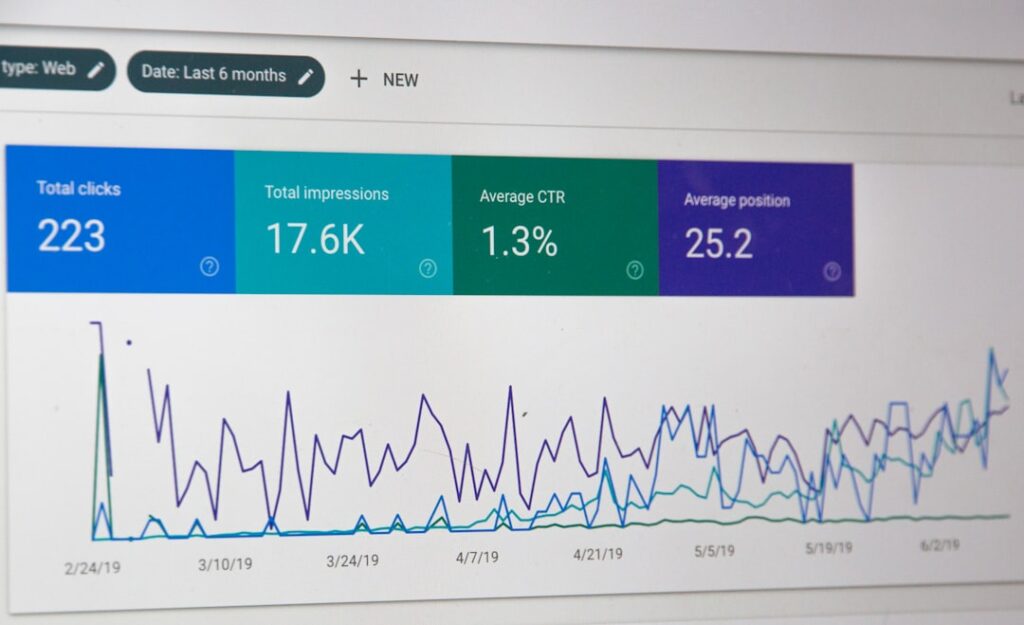
Keyword planner data tells you what the market searches for. Search Console tells you what your site already ranks for. The overlap and the gaps between those two datasets is where your best content opportunities live. If your planner suggests “emergency plumber Austin” and your Search Console shows you already rank at position 14 for that term, writing a dedicated post could push you onto page one. If you rank for a term you never intentionally targeted, that is a signal to build content around it.
This is also where most keyword planners fall short: they have no idea what your specific site already ranks for. A keyword with moderate competition is easy for a site that already has topical authority in that area and nearly impossible for a site that has never written about it. Search Console provides that context. For a walkthrough of connecting Search Console data to your content workflow, our guide to the best automated SEO tools for WordPress covers how this integration works in practice.
Where Keyword Planners Fall Short
Keyword planners are blind to context. They give you volume and competition data in a vacuum, with no awareness of your site’s current authority, your existing content, or the specific SERP features that might block you from ranking even with a great post. Knowing these blind spots keeps you from over-trusting the data and making decisions that a fuller picture would have prevented.
| Capability | What Planners Do Well | Where They Fall Short |
|---|---|---|
| Search volume | Provide directional estimates for prioritization | Free tools give ranges, not exact numbers. Third-party estimates vary by 30 to 50 percent across tools. |
| Competition | Flag ad competition (Google) or estimate organic difficulty (third-party tools) | Ad competition does not equal organic difficulty. Difficulty scores ignore your site’s existing authority. |
| Search intent | Suggest related queries that hint at intent | Cannot distinguish informational, commercial, or transactional intent. You must infer it manually. |
| SERP features | Not available in most planners | Won’t tell you if a keyword triggers featured snippets, local packs, or video results that push organic links down. |
| Your site context | Not available | No awareness of your existing content, current rankings, or topical authority in a given cluster. |
| Content gaps | Not available | Won’t show which topics competitors rank for that you don’t. Requires a competitive analysis tool. |
| Trend data | Google Trends shows directional interest over time | Keyword planners show averages, not seasonal spikes. A term averaging 500 searches might hit 2,000 in winter and 100 in summer. |
| Long-tail discovery | Suggests variations and related terms | Misses many natural-language queries, especially question-based searches (“how to,” “why does,” “is it safe to”). |
The Search Intent Problem
A keyword planner shows you that “water heater” gets 60,500 monthly searches. What it does not tell you is that half of those searches are people looking to buy a water heater, a quarter are looking for repair information, and the rest are split between installation guides, reviews, and troubleshooting. If you write a blog post titled “Water Heater” targeting that term, you are serving no one well because you cannot satisfy four different intents on one page.
Intent classification is a manual step. Look at the current top-ranking pages for any keyword. If the results are all product pages, the intent is transactional. If they are blog posts, it is informational. If they are location pages, it is local. Match your content type to what already ranks. A keyword planner will never do this for you.
The SERP Feature Blind Spot
Search for “plumber near me” and the first organic result might appear below a local pack of three map listings, a “People also ask” accordion, and two featured snippets. Even if you rank at position one organically, you could be the fifth thing a user sees. Keyword planners do not account for this. They show you the search landscape as if it were ten blue links, which it stopped being years ago.
Before committing to a keyword, search for it yourself and count how many SERP features sit above the first organic result. If the page is dominated by local packs and ads, your organic content has a smaller click share regardless of rank. This is not a reason to avoid the keyword, but it is a reason to set realistic traffic expectations.
Plugging Keyword Data Into an AI Content Workflow

The gap between keyword research and published content is where most small business blogs die. You spend two hours in a keyword planner, build a list of 30 target terms, and then never write a single post because the research-to-publishing pipeline is too many manual steps. An AI content workflow closes that gap, but only if the keyword data flows into the system in a structured way.
The Workflow: Keyword to Published Post
Here is what the pipeline looks like when keyword planner data feeds into an AI-assisted publishing system:
- Step 1: Export your prioritized keyword list from the planner, grouped into content clusters
- Step 2: Feed each keyword (plus context like your business name, service area, and existing content) into an AI content tool that grounds drafts in live SERP data
- Step 3: The AI generates a structured draft with proper heading hierarchy, internal links to your existing posts, and pre-filled SEO meta fields
- Step 4: You review the draft in an approval queue, adding original examples, verifying facts, and editing for voice (10 to 20 minutes per post)
- Step 5: You approve, and the post publishes directly to WordPress via the REST API with categories, tags, and featured images set
Steps 1 and 4 are yours. Steps 2, 3, and 5 are the AI tool’s. The keyword planner output is the input for Step 2. Without that structured input, the AI is guessing at what to write about. With it, every draft targets a specific keyword you have already validated has search volume and manageable competition.
Combining Planner Data With Search Console Data
The strongest content workflows use two data sources: keyword planner data for new topic discovery and Search Console data for optimization of existing content. A keyword planner tells you “emergency water heater repair Austin” has 320 monthly searches and low competition. Search Console tells you that your post about “water heater repair” already ranks for that exact term at position 22. The action: either update the existing post to target the more specific term, or create a new spoke post that links to the existing pillar.
ClearPost handles this combination natively. The plugin reads your Google Search Console data, identifies terms you already rank for, cross-references them with keyword opportunity, and drafts content that targets the gaps. You approve every post before it goes live. No auto-publishing, no content published without your review. The AI does the heavy lifting between keyword data and draft generation. You stay in the editorial chair.
The Honest Tradeoff
Here is the tradeoff you are making when you replace an agency workflow with a keyword-planner-plus-AI workflow: you give up specialist strategic direction in exchange for speed, cost efficiency, and editorial control. An agency SEO specialist would look at your keyword list, analyze the SERP for each term, map competitive gaps, and build a content calendar with those factors baked in. You can do this yourself, but it takes time and judgment that the planner alone will not supply.
The cost difference is significant. An agency charges $437 to $1,250 per published post. A WordPress-native AI content tool like ClearPost brings that down to $3 to $10 per post. Over a year, that is the difference between spending $50,000-plus and spending $1,200 to $3,600. For the full cost breakdown across agencies, freelancers, and AI tools, our blog content cost analysis breaks down the real per-post numbers. The tradeoff is not free, but for most small business owners and lean marketing teams, the savings and the editorial control are worth the extra strategic effort.
What to Do This Week
Open a keyword planner. Enter your top three services with your city as a modifier. Export 20 related queries, group them into 3 to 4 content clusters, and identify 5 keywords with the lowest competition and at least 100 monthly searches. Those 5 keywords are your first month of content. Feed them into an AI content workflow, review every draft before publishing, and track their ranking positions after 30 days. If you would not book from a page you published, edit it harder before scaling. For a complete walkthrough of setting up this workflow on WordPress, our AI blog autopilot guide covers the setup step by step.
Try ClearPost free for 7 days. AI does the heavy lifting, you approve every post before it goes live. No long onboarding, no agency overhead, cancel anytime.
Frequently Asked Questions
Here are the questions we hear most often from small business owners and lean marketing teams about using a keyword planner for WordPress content.
Frequently Asked Questions
Is Google Keyword Planner free to use?
Yes, Google Keyword Planner is free, but you need a Google Ads account to access it. You do not need to run active ad campaigns. Creating an account and accessing the planner costs nothing. Free accounts show search volume as ranges (like 1K to 10K) rather than precise numbers. More exact volume data is available if you run active ad campaigns.
How accurate are keyword planner search volume numbers?
Keyword planner volume numbers are directional estimates, not exact counts. Google’s free tool shows ranges that can represent anywhere from 10 percent to 10x the midpoint. Third-party tools like Ahrefs and SEMrush estimate volume from clickstream data and can vary by 30 to 50 percent from each other. Treat volume as a prioritization signal to compare keywords against each other, not as a traffic forecast.
Can a keyword planner tell me which keywords I can actually rank for?
No. A keyword planner shows volume and competition data in a vacuum. It does not account for your site’s domain authority, existing content, or current rankings. To assess ranking opportunity, cross-reference planner data with your Google Search Console performance data. If you already rank for a keyword at position 15 or 20, a targeted post can push you to page one. If you have no existing authority on the topic, even a low-competition keyword may take months.
Should I use a keyword planner or Google Search Console for content planning?
Use both. A keyword planner helps you discover new topics and validate search volume for terms you are not yet targeting. Search Console shows you what your site already ranks for, which reveals quick-win opportunities to improve existing content or create supporting posts. The strongest content workflows use planner data for discovery and Search Console data for optimization, then feed both into an AI content workflow that drafts posts targeting the gaps.
How do I turn keyword planner data into actual blog posts?
Group your exported keywords into content clusters (one pillar topic plus several related subtopics), prioritize by lowest competition with at least 100 monthly searches, then feed each keyword into an AI content tool that grounds drafts in live SERP data. Review every draft before publishing to add original examples and verify facts. A WordPress-native tool like ClearPost automates the drafting, internal linking, and publishing steps while keeping you in an approval queue before anything goes live.