

You’re managing 20+ WordPress client sites. Every client wants “more traffic,” nobody wants more meetings, and you’re tired of duct-taping five tools together just to ship four posts a month. The fix isn’t “work harder.” It’s a deliberately layered SEO stack where AI does the repetition and you keep the decisions.
The Agency Scaling Problem: Too Many Sites, Not Enough Hours
If you’re the operator, scaling breaks in the same two places every time: production and reporting. Content creation turns into a bottleneck, and client communication expands to fill every Friday. The practical goal in 2026 is simple: one person can run 20+ sites if the stack enforces a workflow and reduces context switching.
At ClearPost, we see the same pattern across agencies: you don’t need more dashboards. You need one operating system for keyword selection, briefing, drafting, on-page QA, publishing, monitoring, and reporting, with approvals as the control point. That’s what the stack below is designed to do.
The 2026 SEO Software Stack: What One Operator Running 20 Sites Actually Uses
This is a portfolio-first stack: one primary suite for research and tracking, one WordPress control plane, one technical crawler, one content optimizer, and one reporting layer. You can swap components, but you should not add components unless they remove steps from your weekly loop.
| Layer | Tool(s) | What it does in the stack | Pricing (public starting point) |
|---|---|---|---|
| Portfolio keyword + rank + audit suite | SE Ranking | Projects, rank tracking, audits, competitor research, optional white-label and AI visibility add-ons | $129/month (Core, monthly) or $279/month (Growth, monthly); annual discounts available |
| Deep competitive research (optional) | Ahrefs | When you need deeper link analysis and competitive exploration than most suites provide | Lite $129/month; Standard $249/month; Advanced $449/month |
| On-page content optimizer | SurferSEO or Clearscope | Briefing, scoring, on-page coverage guidance, and editor-level QA | Surfer from $59/month (Discovery, monthly); Clearscope from $129/month (Essentials, monthly) |
| Technical crawling | Screaming Frog SEO Spider | Repeatable crawls for indexation, templates, redirects, canonicals, and bulk QA | $279/year per license |
| WordPress multi-site ops | ManageWP (or MainWP) | Updates, monitoring, backups, and one place to log into 20+ sites | Pricing varies by add-on and per-site usage |
| Search performance truth source | Google Search Console | Queries, pages, index coverage, performance validation | Free |
| Client dashboards | Looker Studio | Monthly reporting dashboards pulling from GSC/GA4 and your tracker | Free (connectors may cost extra) |
| Client-ready SEO reporting (optional) | AgencyAnalytics | White-label reporting, scheduled reports, multi-channel widgets | Starts at $59/month (varies by plan and client count) |
| On-site SEO plugin | Rank Math (or Yoast) | Titles/meta, schema, sitemaps, on-page checks in WP | Rank Math paid plans commonly shown around $7–$50/month depending on tier; Yoast Premium commonly listed at $99/year for 1 site |
Layer 1: Keyword Research & Content Planning at Scale

The fastest way to fail with 20 sites is to “do keyword research” from scratch every month. In a portfolio model, you need a repeatable planning template: pick themes, assign a small number of primary pages to win, then let supporting content ship on a schedule. Your tooling should make this boring.
For most operators, a suite like SE Ranking is enough for day-to-day research and tracking because it combines keyword research, rank tracking, and site audits in one place. Keep Ahrefs as an optional deep-dive tool for link-heavy niches or competitive gap analysis where you genuinely need its dataset.
The planning unit that scales: “20 sites, 4 themes each, 1 primary target per theme”
Instead of trying to publish “as much as possible,” plan around four themes per site (services, problems, comparisons, local modifiers) and assign one primary page per theme to improve each quarter. Everything else becomes supporting content that feeds internal links into those targets.
AI integration that actually helps (and doesn’t hallucinate your strategy)
Use AI to accelerate clustering, intent labeling, and brief drafting, but do not let AI choose keywords unsupervised. The operator decision is: which pages are the money pages, and what proof will you show in 60 days that the work is moving? That’s a human job.
Layer 2: AI-Powered Content Production (Without Losing Quality Control)

AI content only scales if you enforce quality control through a single approval gate. The goal is not “publish 200 posts.” The goal is “publish consistently, with a predictable standard, across 20+ sites.” That requires a workflow where briefs, drafts, optimization, and WordPress publishing are connected.
At ClearPost, we treat AI as the drafting engine and you as the editor-in-chief. You approve every post before it goes live. No surprises. That is the only model that works when clients are paying you for outcomes, not experiments.
Recommended production loop (per site)
Start with one brief per money page and three briefs for supporting posts. Draft with AI, then run each draft through an on-page optimizer like SurferSEO or Clearscope for coverage and structure. Final pass is a human check for accuracy, brand voice, and “does this answer the query better than what’s ranking?” Then publish and internally link.
What not to automate
Don’t automate facts, claims, or medical/legal/financial advice. Don’t automate local business NAP details. Don’t automate case studies. If you’re running 20 sites, one factual error copied across templates becomes 20 client fires. AI is for first drafts and structure, not unchecked assertions.
If you’re experiencing these symptoms, our team at ClearPost can help.
Layer 3: Rank Tracking & Performance Monitoring Across Portfolios
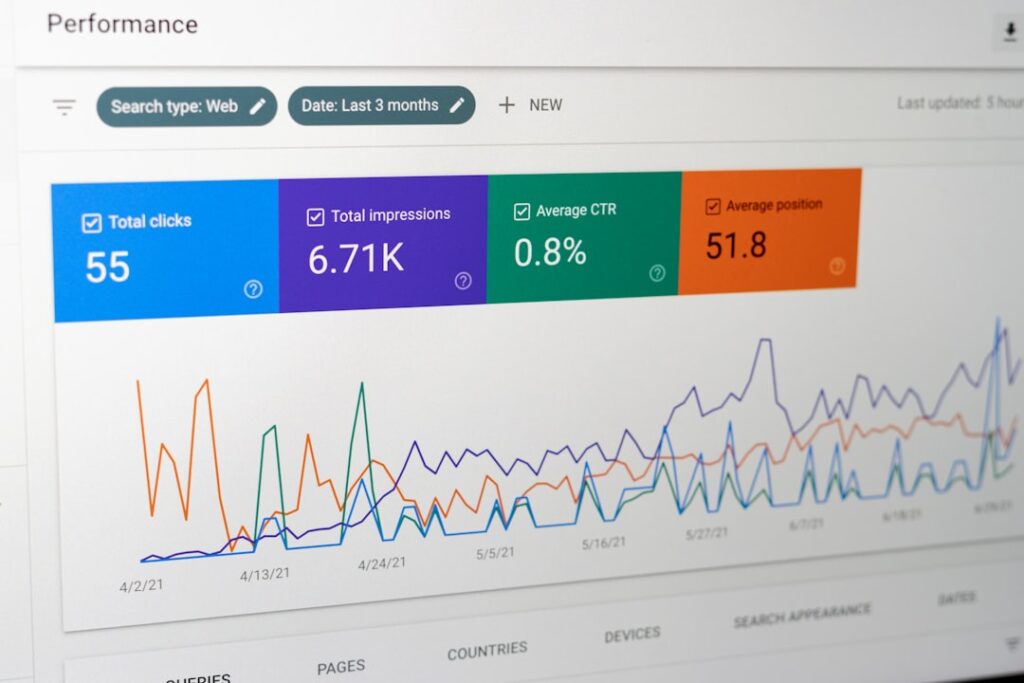
Rank tracking only matters if it changes what you do next week. In a multi-site portfolio, you need a single dashboard that shows: winners to double down on, losers to fix, and pages that are close to page one. That’s it. Anything else is noise you’ll never act on.
Use SE Ranking (or a dedicated tracker if you prefer) to monitor a curated keyword set per site. Pair it with Google Search Console as the source of truth for queries and pages that are actually earning impressions and clicks.
The weekly portfolio review (30 minutes, not 3 hours)
Every Monday: look for pages with rising impressions but low CTR, pages sitting in positions 4–15, and newly published posts that are indexed but not getting impressions. Those are your next actions: rewrite titles/meta, add internal links, expand sections, and fix technical blockers. Then move on.
Layer 4: Technical SEO Automation for Multi-Site Management
Technical SEO is where agencies lose the most time because every site becomes “special.” Your job is to standardize. One WordPress stack, one SEO plugin configuration, one crawl checklist, and one way to ship fixes. That consistency is what lets one operator manage 20+ sites without drowning.
Multi-site ops: updates, uptime, and access
Use a WordPress management dashboard like ManageWP (or a self-hosted option like MainWP) so plugin updates, monitoring, and logins aren’t 20 separate workflows. This isn’t “nice to have.” It’s what prevents maintenance from eating your content budget.
Your technical crawler: repeatable, scheduled audits
Screaming Frog remains the workhorse for repeatable crawls across templates, redirect chains, canonical mistakes, thin pages, and indexation patterns. One paid license gives you unlimited crawls (within your machine limits), which is exactly what you need for multi-site QA.
On-site SEO plugin: pick one standard and stop debating it
Pick Rank Math or Yoast and standardize your defaults: sitemap settings, schema approach, title templates, and indexation rules for archives and tags. The win isn’t which plugin is “best.” The win is that every new site you onboard starts from the same baseline.
Layer 5: Client Reporting That Doesn’t Eat Your Fridays

Client reporting should be a product, not a weekly custom project. The system that scales is: automated dashboards + one monthly human summary per client. If you’re still building reports manually, you’re not running an SEO operation. You’re running a reporting service with some SEO attached.
Use Looker Studio for free dashboards built on Google Search Console and GA4. If you need white-label portals and scheduled deliverables across channels, tools like AgencyAnalytics can replace a lot of spreadsheet work. But don’t buy reporting software to avoid having hard conversations about strategy.
The “one-slide executive summary” rule
Every client gets the same summary structure: what shipped, what moved (wins and losses), what we’re doing next month, and one risk. This keeps you out of endless Slack threads and forces the work to stay outcome-focused.
How to Integrate the Stack: Workflow Architecture
If your tools don’t connect, you’ll compensate with meetings and spreadsheets. The integration architecture that works is: one place to plan, one place to draft, one place to publish, and one place to prove results. Everything else is optional.
Portfolio workflow (the version you can run weekly)
Step 1: Pick themes and target pages in your suite. Step 2: Generate briefs and outlines, then draft in your AI production tool. Step 3: Optimize on-page in SurferSEO or Clearscope. Step 4: Publish in WordPress with a standardized template and internal links. Step 5: Monitor in rank tracking and validate in Search Console. Step 6: Report via Looker Studio or your reporting platform.
Where ClearPost fits
At ClearPost, we focus on the part that usually breaks first: consistent content production inside WordPress without adding writers or project managers. The operator stays in control through approvals, and the system keeps drafts moving to publish instead of piling up.
Total Cost Breakdown: What This Stack Actually Costs
Costs vary by client count and limits, but you can still budget the stack like an operator. The rule: spend on the bottleneck you’re actually facing. If reporting is your bottleneck, pay for reporting. If content is the bottleneck, pay for production and QA. Don’t buy “more features” to avoid choosing.
| Stack option | Tools included (example) | Expected monthly software cost (approx.) | Who it’s for |
|---|---|---|---|
| Lean operator stack | SE Ranking Core + Surfer Discovery/Standard + GSC + Looker Studio + Screaming Frog | Contact for current details (depends on Surfer plan and billing terms); Screaming Frog is annual | Solo operator managing ~10–20 sites with light reporting needs |
| Agency scale stack | SE Ranking Growth (+ optional agency add-ons) + Surfer Pro + AgencyAnalytics + Screaming Frog | Contact for current details (varies by client count, add-ons, and billing terms) | Operator managing 20+ sites who needs client-facing reporting and higher limits |
| Competitive niches add-on | Agency scale stack + Ahrefs Standard/Advanced | +$249 to +$449/month (Ahrefs tier dependent) | Link-heavy, competitive SERPs where deeper off-page research pays for itself |
Scaling from 5 to 20+ Client Sites: What Changes
At 5 sites, you can “wing it” with ad hoc processes. At 20+, you need constraints. The biggest change is that you stop optimizing for perfect and start optimizing for throughput with guardrails. That means templates, defaults, and a strict definition of done for every deliverable.
Three non-negotiables at 20+ sites
First, standardize your WordPress setup so every fix is repeatable. Second, keep a fixed KPI set per client (usually GSC clicks, impressions, and a small tracked keyword set). Third, run a content cadence that you can sustain for 6 months without heroics. Consistency beats bursts.
The honest tradeoff: you will say “no” more often
Clients will ask for one-off pages, custom reports, and random “SEO audits.” You can do that at 5 sites. At 20+, you either productize it or you don’t offer it. Your stack is only as scalable as your willingness to protect the process.
Frequently Asked Questions
Below are the most common questions we hear from operators trying to scale multi-site SEO in 2026.
Start Scaling Your Agency with AI-Powered SEO
You don’t need another “SEO hack.” You need a stack and workflow that lets one operator run 20+ WordPress sites with consistency, quality control, and proof. Start your free 7-day trial with ClearPost — no long onboarding, no agency overhead, cancel anytime. You approve every post before it goes live.
Contact ClearPost today to schedule a consultation.
Automating Blog Content Across 20 Client Sites
The biggest time sink in multi-site management is not publishing or optimization. It is content production. Writing original blog posts for 20 sites manually is a full-time job for a small team. Automating this without sacrificing quality requires the right tool setup and a clear workflow.
The Agency Content Pipeline
Most agencies managing 20+ sites follow some version of this workflow: keyword research per client niche, content briefs, writing, editing, SEO optimization, publishing, and performance tracking. Each step multiplied by 20 sites creates bottlenecks that automation can compress.
AI blog post generators handle the research-to-draft phase. The best ones for WordPress integrate directly with your sites so there is no copy-paste step. Our comparison of AI blog post generators covers which tools can handle this pipeline end to end.
Content Quality at Scale
The concern with automated content across client sites is consistency. Each client has a different voice, audience, and keyword strategy. A tool that produces generic content forces you to manually rewrite every post, which defeats the purpose of automation.
The solution is using AI content writing plugins that allow per-site configuration: different tones, keyword focuses, and content guidelines for each installation. This way the automation respects client differences instead of flattening them.
Publishing Cadence Across Sites
With 20 sites, you need a system for staggering content. Publishing all sites on the same day creates a review bottleneck and makes it harder to spot issues. Most agencies find that 2 to 4 posts per week per site is the sweet spot where content quality stays high enough to rank without overwhelming the review process.
For agencies in specific verticals like healthcare, legal, or local services, there is an additional consideration: AI-generated local SEO content requires location-specific details that generic content tools miss. Make sure your automation tool can inject local context (city names, service areas, local competitors) into each post.
Making AI Content Sound Client-Ready
The fastest path from AI draft to published post is getting the initial output close enough that editing takes minutes, not hours. Our guide on making AI blog posts sound natural covers the specific settings and techniques that reduce editing time per post, which compounds significantly across 20 sites.
SEO Plugin Configuration at Scale
Running SEO across 20 sites without a consistent plugin setup is how agencies end up with mismatched schema markup, missing meta descriptions on half their posts, and conflicting sitemap configurations. Standardizing your SEO plugin choice and configuration template saves hours every week.
Yoast vs All in One SEO for Multi-Site Management
The two dominant options both work, but they have different strengths at scale:
| Feature | Yoast SEO | All in One SEO |
|---|---|---|
| Bulk editing tools | Basic (title/meta only) | Advanced (includes schema, social) |
| Schema markup | Automatic for common types | More granular control per post type |
| Multi-site license cost | Per-site pricing adds up | Agency plans available |
| Template variables | Good selection | More flexible custom variables |
| Local SEO add-on | Separate premium add-on | Included in Pro |
| Redirect manager | Premium only | Included in Pro |
We did a full breakdown of All in One SEO for WordPress that covers its multi-site features in detail. For agencies considering Yoast, our Yoast first-time configuration guide walks through the optimal setup that you can replicate across client sites.
If you are already using Yoast and wondering whether it is still the right choice, our Yoast SEO in 2026 analysis covers what has changed and whether switching makes sense for agencies. If the redirect manager and internal linking tools in the table above are the deciding factor, our Yoast Premium review breaks down whether the $99/year holds up across a client roster.
Building a Configuration Template
Whichever plugin you choose, create a baseline configuration that you deploy to every new client site:
- Title templates using dynamic variables (post title, site name, separator) so titles generate correctly without per-post input
- Meta description templates with fallbacks so no post goes live with a blank description
- Schema defaults per post type (Article for blog posts, LocalBusiness for service pages, FAQ where applicable)
- Sitemap settings excluding tag archives, author pages, and other thin content from the index
- Social sharing defaults with Open Graph images and Twitter card settings pre-configured
For a broader view of how SEO plugins fit into the full automation stack, our roundup of automated SEO tools covers how to layer content generation, on-page optimization, and rank tracking into a single workflow.
If you want to take the automation further, an automatic blog post generator that handles keyword research through publishing means your SEO plugin only needs to handle the on-page optimization layer, not the entire content pipeline.
Frequently Asked Questions
What’s the minimum SEO stack to manage 20+ WordPress client sites solo?
A practical minimum is one SEO suite for keyword research and rank tracking, Google Search Console for validation, one technical crawler for audits, one on-page optimizer for content QA, and a WordPress multi-site management tool for updates and access.
Should I use an all-in-one SEO platform or separate tools in 2026?
If you’re a solo operator, an all-in-one platform can reduce context switching. Add specialized tools only when they remove real steps from your workflow, such as deeper link research or white-label reporting at scale.
How do I use AI for SEO content without risking quality issues?
Use AI to draft and structure content, but keep a human approval gate for factual accuracy, brand voice, and intent match. Pair AI drafts with on-page optimization tools and publish only after review.
How many keywords should I track per client site?
Track a curated set you’ll actually act on, typically focused on primary service pages and key supporting topics. Use Search Console to discover additional queries rather than trying to track everything.
What should a scalable monthly SEO report include?
A scalable report includes what shipped, what moved in search performance, what you’re doing next month, and one clear risk or blocker. Dashboards can automate the charts, but the summary should stay simple and outcome-focused.
Install ClearPost free on WordPress.org. Set up in 2 minutes, approve every post before it goes live.
{“@context”: “https://schema.org”, “@type”: “FAQPage”, “mainEntity”: [{“@type”: “Question”, “name”: “What’s the minimum SEO stack to manage 20+ WordPress client sites solo?”, “acceptedAnswer”: {“@type”: “Answer”, “text”: “A practical minimum is one SEO suite for keyword research and rank tracking, Google Search Console for validation, one technical crawler for audits, one on-page optimizer for content QA, and a WordPress multi-site management tool for updates and access.”}}, {“@type”: “Question”, “name”: “Should I use an all-in-one SEO platform or separate tools in 2026?”, “acceptedAnswer”: {“@type”: “Answer”, “text”: “If you’re a solo operator, an all-in-one platform can reduce context switching. Add specialized tools only when they remove real steps from your workflow, such as deeper link research or white-label reporting at scale.”}}, {“@type”: “Question”, “name”: “How do I use AI for SEO content without risking quality issues?”, “acceptedAnswer”: {“@type”: “Answer”, “text”: “Use AI to draft and structure content, but keep a human approval gate for factual accuracy, brand voice, and intent match. Pair AI drafts with on-page optimization tools and publish only after review.”}}, {“@type”: “Question”, “name”: “How many keywords should I track per client site?”, “acceptedAnswer”: {“@type”: “Answer”, “text”: “Track a curated set you’ll actually act on, typically focused on primary service pages and key supporting topics. Use Search Console to discover additional queries rather than trying to track everything.”}}, {“@type”: “Question”, “name”: “What should a scalable monthly SEO report include?”, “acceptedAnswer”: {“@type”: “Answer”, “text”: “A scalable report includes what shipped, what moved in search performance, what you’re doing next month, and one clear risk or blocker. Dashboards can automate the charts, but the summary should stay simple and outcome-focused.”}}]}